
WordPress continues to evolve at a rapid pace, and the upcoming WordPress 6.9 release marks one of the most significant updates in recent years. Positioned as the “Collaboration Release,” WordPress 6.9 introduces powerful new features that make content creation, editing, and team workflows smoother than ever. Whether you manage a business website, run an online store, publish content regularly, or work with a WordPress development agency like Glopbe, this update brings meaningful improvements across both usability and performance.
Building on the progress of the Gutenberg project, WordPress 6.9 enhances the block editor, introduces collaboration tools like block-level Notes, improves design consistency through theme.json updates, and adds modern APIs that developers can use to build faster, more dynamic, and more scalable WordPress experiences. Beyond features, the release also delivers better performance, stronger security practices, and updates that reduce dependency on multiple plugins.
In this complete guide, we’ll break down the WordPress 6.9 release date, explore its new features, and explain its real-world impact for site owners, businesses, and developers. If you’re planning to upgrade your existing website or thinking of building a new one on WordPress this article will help you understand exactly what to expect from version 6.9 and why it matters in 2026.
WordPress 6.9 Release Date & Update Timeline
WordPress 6.9 is officially scheduled for release on 2 December 2025, marking the final major update of the year and the last significant milestone in the 2025 development cycle. This release follows the earlier major update, WordPress 6.8, which rolled out in April 2025, and continues WordPress’s predictable twice-a-year major release roadmap.
As the year-end release, WordPress 6.9 delivers a polished and stable set of features that have gone through multiple beta versions and release candidates before the final launch. For website owners, this timing is strategic the update arrives after peak business seasons like Black Friday, Cyber Monday, and holiday campaigns, ensuring fewer disruptions for eCommerce sites, agencies, and enterprise teams managing high-traffic periods.
Suggested Upgrade Plan
Although WordPress 6.9 is designed to be a smooth upgrade, it’s still a major release, which means careful preparation is important. Agencies and website owners should consider:
- Upgrading after major sales or campaign periods: Ideal for eCommerce, booking platforms, and B2B sites that run quarterly campaigns or seasonal promotions.
- Testing on a staging environment first: This allows teams to verify plugin compatibility, theme support, editor improvements, and new collaboration tools before going live.
- Ensuring backups and version control are in place: A standard best practice, especially for large or mission-critical websites.
- Reviewing workflows if multiple editors or content teams are involved: Since WordPress 6.9 introduces collaborative editing tools like block-level Notes, it’s a good opportunity to refine editorial processes.
Following this upgrade plan ensures a smooth transition and allows users to take full advantage of the new performance, collaboration, and design capabilities introduced in WordPress 6.9.
What’s New in WordPress 6.9? Key Features You’ll Notice Immediately
WordPress 6.9 introduces a powerful combination of collaboration tools, editor enhancements, new native blocks, and developer-focused improvements that make the platform more modern, efficient, and scalable. Unlike previous updates that focused mainly on visual or usability tweaks, WordPress 6.9 is a foundational release laying the groundwork for future AI-driven workflows, automation, and more complex WordPress applications.
Here are the key updates you’ll notice right away:
Collaboration Comes to WordPress Core
WordPress 6.9 brings collaborative editing to the heart of the platform with new features designed for multi-author teams, agencies, and content-heavy websites. The highlight is the introduction of block-level Notes, allowing users to leave comments directly on specific blocks similar to Google Docs-style feedback. This makes reviews, approvals, and content discussions significantly easier without relying on third-party tools.
A More Streamlined, Flexible Editing Experience
The block editor receives several improvements that make creating layouts faster and more intuitive. Enhancements to drag-and-drop interactions, better visual feedback, and more stable block handling help users design pages with less friction. New visibility controls also let you hide or show blocks without custom CSS, ideal for seasonal content, drafts, and A/B testing.
New Core Blocks That Reduce Plugin Dependency
WordPress 6.9 expands the library of native blocks, giving users more design and content options without installing dozens of plugins. Notable additions include:
- Accordion Block for FAQs and collapsible sections
- Math Block for formula rendering
- Time-to-Read, Word Count, Comment Count, and Comment Link blocks for publishing sites
- Term Query Block for taxonomy-based content listings
These built-in tools make it easier to build rich, dynamic pages while maintaining a lightweight and stable website.
Developer Tools That Modernize WordPress
Under the hood, WordPress 6.9 introduces major improvements for developers, including updates to the Abilities API, Interactivity API, Block Bindings, and new enhancements to DataViews and form APIs. These give developers more flexible ways to build dashboards, dynamic interfaces, and headless WordPress applications.
Why This Release Matters
WordPress 6.9 is a strategic evolution of the platform. Its focus on collaboration, performance, and developer extensibility marks a shift toward a more future-proof WordPress ecosystem, capable of supporting AI-assisted workflows, complex client projects, enterprise-grade applications, and more scalable digital experiences.
Major Improvements in the Block Editor & Content Collaboration
WordPress 6.9 marks one of the biggest upgrades to the block editor since the Gutenberg project began, transforming how teams create, review, and publish content. With a strong focus on collaboration and workflow efficiency, this update makes the editor more intuitive, stable, and powerful for both beginners and professionals.
Block-Level Notes: Collaboration Built Into WordPress
The standout feature in WordPress 6.9 is block-level Notes, a long-awaited enhancement that brings real collaboration directly into the editor. Instead of relying on external tools, teams can now:
- Comment directly on individual blocks
- Start threaded conversations
- Resolve or reopen notes
- Receive email notifications for replies or mentions
For agencies, publishers, and multi-author websites, this creates a Google Docs-style workflow right inside WordPress streamlining approvals, content reviews, and internal communication.
Hide/Show Blocks Without Custom Code
Managing dynamic or seasonal content becomes easier with the new Hide/Show Block Visibility toggle. Users can now temporarily disable a block without deleting it or using custom CSS. This is useful for:
- Staging content before launch
- Running limited-time promotions
- Keeping draft elements ready for future use
- Conditional layouts for campaigns
This enhancement simplifies content control and makes the editor more flexible for real-world publishing needs.
Better Drag-and-Drop + Improved Editor Architecture
WordPress 6.9 introduces a smoother, more predictable drag-and-drop experience, allowing users to rearrange blocks with greater accuracy and visual clarity. Behind the scenes, improvements to the editor’s internal architecture make block behavior more stable, reducing layout glitches and improving the overall editing flow.
These changes significantly benefit designers, content teams, and agencies that handle complex page structures or client revisions.
New Native Blocks for Richer Content
To reduce plugin dependency and give users more built-in capabilities, WordPress 6.9 adds several new core blocks, including:
- Accordion Block — ideal for FAQs and collapsible content
- Math Block — supports formulas and mathematical expressions
- Time-to-Read Block — great for blogs and news sites
- Word Count Block — useful for editorial and SEO workflows
- Term Query Block — helps list posts based on categories or custom taxonomies
- Comment Count & Comment Link Blocks — for more flexible comment layouts
These additions help creators build richer, more dynamic pages using native WordPress tools, improving performance and reducing plugin bloat.
Performance, Stability and Modernization Under the Hood
WordPress 6.9 is not only about visible features. A large part of this release focuses on behind-the-scenes improvements that make websites faster, lighter and more stable. These updates strengthen the core foundation of WordPress and prepare it for more advanced use cases in the future.
More Efficient Script and Style Loading
WordPress 6.9 optimizes how scripts and styles are loaded, reducing unnecessary assets and improving page speed. With better handling of dependencies and more streamlined resource delivery, websites experience faster load times and improved responsiveness, especially on mobile devices.
Improved Query Cache Management
Database queries are now processed more efficiently thanks to enhanced query caching. This reduces server load, speeds up content rendering and helps large or content-heavy websites run more smoothly. Sites that serve high traffic or rely on dynamic content benefit the most from this improvement.
Modern UTF-8 Support Across the Platform
The update includes expanded modern UTF-8 support, improving the handling of multilingual content, special characters and global scripts. This is particularly helpful for websites operating in multiple languages or regions, ensuring cleaner data processing and fewer encoding issues.
Removal of Legacy Internet Explorer Assets
WordPress 6.9 removes outdated Internet Explorer-specific code and assets. Eliminating this legacy support reduces bloat and results in a lighter core. The platform continues to modernize and align with current web standards, improving performance and reducing maintenance burden for developers.
Reduced Dependence on Third-Party Plugins
With new native blocks and more built-in design tools, many websites will no longer need extra plugins for basic layouts or interactive elements. Fewer plugins means:
- Fewer compatibility issues
- Lower security risks
- Faster updates
- Improved long-term site health
This shift makes WordPress easier to maintain and more stable for long-term business and agency projects.
Developer and Theme-Builder Enhancements
WordPress 6.9 brings several important upgrades for developers, theme builders and advanced users who want more control, flexibility and modern development capabilities. These enhancements strengthen the WordPress core, support more complex applications and streamline the way custom themes and plugins are built.
Abilities API for Standardised Capability Registration
The new Abilities API creates a unified way for core, plugins and themes to register and manage capabilities. This makes WordPress more structured and predictable for developers. By giving the platform a more machine-readable foundation, the API opens the door for future automation tools, AI integrations and smoother cross-plugin interoperability. For agencies and enterprise teams, this means more consistent permission handling and cleaner system architecture.
Improvements to Interactivity API and Block Bindings
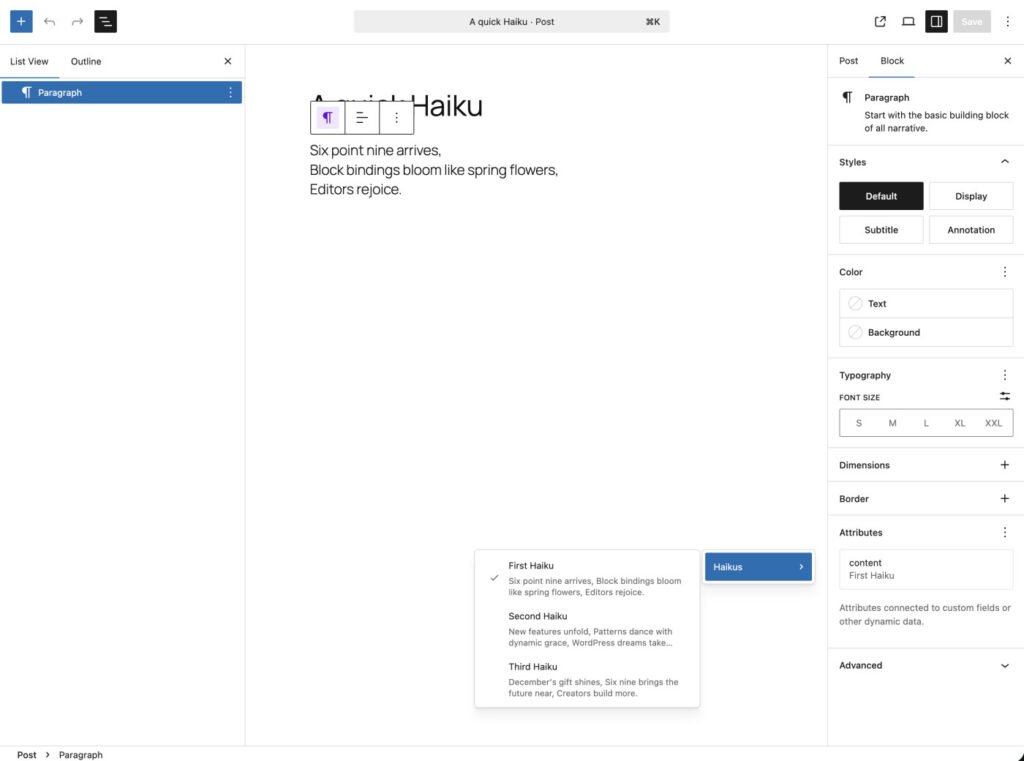
WordPress 6.9 expands the Interactivity API and Block Bindings API, giving developers more power to create dynamic front-end interactions without relying on heavy custom JavaScript. These updates make it easier to build reactive components and interactive layouts that feel more like modern web applications.
Enhanced DataViews, DataForm and Fields API
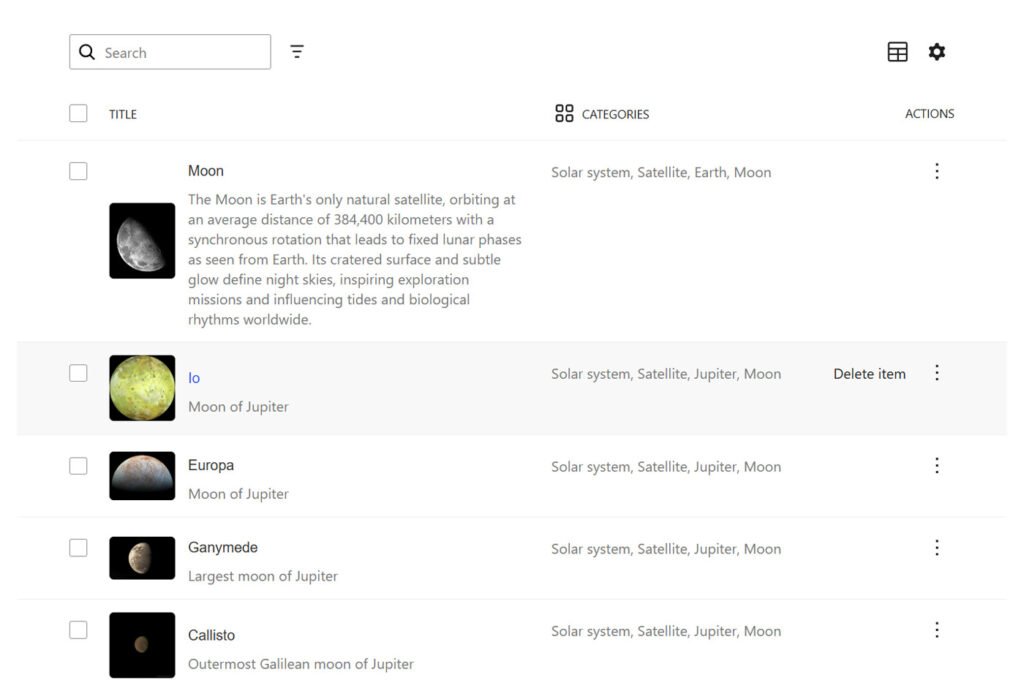
This release also strengthens the tools used to build custom admin panels and data-driven workflows. With better support for DataViews, DataForm and the Fields API, developers can create structured interfaces, dashboards and management tools inside WordPress. These capabilities are especially useful for enterprise projects, SaaS-style experiences and headless WordPress setups.
Theme-Level UI Improvements for Cleaner Design Workflows
- Design-focused enhancements in WordPress 6.9 give theme builders greater control without writing extensive custom CSS. Key improvements include:
Form element styling through theme.json - Border-radius presets for consistent shapes and styling
- Button typography inheritance for uniform text styling across the site
These features help maintain design consistency, simplify theme development and reduce the need for additional styling plugins.
Who Benefits: Real-World Impact on Different Types of Websites
WordPress 6.9 introduces features that offer meaningful improvements for all types of users. From content creators to business owners and developers, this update enhances workflows, reduces complexity and supports more advanced use cases. Below is a breakdown of how different website types benefit from the new release.
For Content-Heavy and Editorial Websites or Blogs
Websites that publish articles, news, tutorials or editorial content will immediately notice smoother collaboration and improved structure. The new block-level Notes feature allows writers, editors and reviewers to leave targeted feedback within the editor, making the publishing workflow more efficient. Built-in blocks such as Time to Read, Word Count and Accordion help create better content layouts without relying on additional plugins. These improvements make multi-author blogs, news platforms and publications easier to manage and faster to update.
For Business and Agency Websites or Client Projects
Business websites and agency-managed client projects gain more flexibility and stability in WordPress 6.9. The ability to hide or show blocks provides greater control over seasonal content, product announcements, campaign sections and draft elements without deleting or recreating layouts. Reduced dependence on third-party plugins also results in fewer compatibility issues, simpler maintenance and improved site performance. With enhanced styling tools in theme.json, businesses can maintain consistent branding and design across all pages with less effort.
For Developers, Agencies and Custom Web Applications
Developers and technical teams benefit significantly from the new APIs introduced in this release. The Abilities API, Interactivity API, Block Bindings and enhancements to DataViews and related tools allow for more advanced application development within WordPress. Teams can create custom dashboards, reactive interfaces, data-driven admin tools, headless setups and even AI-assisted workflows more easily. The improved architecture also provides a more stable foundation for long-term plugin and theme development, enabling scalable and maintainable solutions for complex projects.
Should You Upgrade to WordPress 6.9: Pros, Considerations and Best Practices
WordPress 6.9 is one of the most feature-rich updates released in recent years, but like any major version change, it is important to evaluate its advantages and risks before upgrading. The following points will help you decide the right time and approach for updating your website.
Pros of Upgrading to WordPress 6.9
Upgrading to version 6.9 offers several strong benefits for both everyday users and advanced teams:
Powerful collaboration features through block-level Notes
- A more refined block editor with improved usability and stability
- Better website performance and smoother resource loading
- Stronger long-term support through modern APIs and updated PHP compatibility
- Reduced dependence on third-party plugins due to new native blocks and enhanced design tools
These improvements make WordPress 6.9 a valuable upgrade for anyone looking to future-proof their website or streamline ongoing development and content workflows.
Key Considerations Before Updating
Although WordPress 6.9 is designed for a smooth transition, careful planning is essential. Before upgrading, review the following:
- Check theme and plugin compatibility to ensure nothing breaks
- Back up your entire website, including files and databases
- Test important user flows such as forms, checkout processes, membership logins and custom templates
- Review any custom-coded functionality or integrations that may rely on older APIs
Taking these steps helps avoid disruptions, especially for websites that handle transactions, bookings or mission-critical operations.
Best Practices for a Safe Upgrade
The safest way to adopt WordPress 6.9 is to test thoroughly in a non-production environment. Recommended practices include:
- Use a staging or sandbox environment to simulate the upgrade
- Review new block behavior and ensure the editor performs as expected
- Validate plugin and theme compatibility before applying the update to live sites
- Involve editors or content managers to test collaboration features and workflows
- Schedule the final upgrade during low-traffic hours for minimal impact
Following these best practices ensures a smooth and predictable upgrade, allowing you to take full advantage of the new capabilities introduced in WordPress 6.9.
Final Thoughts
WordPress 6.9 represents an important step forward in the evolution of the platform. It strengthens the editing experience, introduces powerful collaboration tools and delivers meaningful performance and stability improvements. For businesses, agencies, publishers and developers, the release provides a more flexible and scalable foundation that supports modern workflows and long-term growth.
The introduction of new native blocks, improved design controls and advanced APIs also reduces the need for external plugins and custom development. This results in simpler maintenance, fewer compatibility issues and a healthier ecosystem for building both small websites and large enterprise applications. Many organizations that rely on a Professional WordPress Development Service will find that version 6.9 makes it easier to create scalable, efficient and future-ready websites with less friction.
Whether you manage a content-heavy blog, run a business website or build complex projects for clients, WordPress 6.9 offers real value and future-proof capabilities. With proper testing and a planned upgrade process, most websites can safely adopt this version and benefit from its enhancements.
As WordPress continues to move toward improved collaboration, automation and a more modern development framework, version 6.9 sets the stage for what comes next in 2026 and beyond.