Website Design & Development
  Web Application Development
  Branding & Logo Design
  Care Plans & Maintenance


 WordPress
  Laravel
You delete the infected files, refresh the folder, and they're already back. A newly documented WordPress backdoor called SC is built to do exactly that.
TL;DR
- SC is a WordPress backdoor documented by Sucuri researchers in late September 2026. It can rebuild itself after you remove visible files.
- It spreads its components across at least eight locations: PHP configuration, plugin folders, early-loading files, the active theme, the database, and server memory.
- It can hide an administrator account, steal active admin session tokens, remove security plugins, and push browser scripts that could enable payment theft.
- Its commands come through public Ethereum gateways, so blocking one domain won't cut it off.
- Cleanup has to be ordered and coordinated. Deleting files first can make things worse.
- If a file returns after you delete it, treat that as unfinished cleanup, not a new attack.
What Is the SC WordPress Malware?
SC is a persistent backdoor that Sucuri analysts found while cleaning compromised websites, and they published their findings on September 30, 2026. The malware isn't dangerous because of one clever trick. It's dangerous because it has many redundant parts, and each part can restore the others.
Two things are unknown. The research doesn't establish how SC first gets onto a site, and it doesn't say how many websites are affected. That matters for your response, because cleaning the malware without closing the entry point leaves you open to reinfection.
Why Normal Cleanup Fails
Most WordPress cleanups follow a familiar routine: find the malicious file, delete it, scan again, and move on. That works against simple malware, where one file is the whole infection.
SC works more like a team of backups. You remove one piece and another notices and puts it back. A scheduled task might restore a file, a theme snippet might recreate a plugin, or a payload stored in the database might rebuild everything.
Think of a house with several hidden spare keys. Changing the front door lock accomplishes nothing if someone can walk in through three other doors you haven't found.
How SC Survives: Layer by Layer
[Visual suggestion: a diagram with each layer as a node and arrows showing which components restore which.]
Layer 1: The execution trigger in PHP configuration
SC uses a PHP setting called auto_prepend_file, placed in files such as .user.ini, php.ini, or .htaccess. It tells PHP to run a specific file before every PHP request, including requests that never touch WordPress. The malware gets to run early, and normal WordPress security checks never see it.
Layer 2: Visible and hidden loaders
A visible intermediary file in wp-content loads a hidden loader. This keeps the entry point stable while hiding the main loader. File names vary between sites, so don't rely on a single name when hunting.
Layer 3: The fake caching plugin
The loader restores a malicious plugin disguised as a caching tool, complete with a convincing settings page. It can come back from an existing copy, an encoded backup, or a compressed recovery archive. Identical copies sit in both the regular plugins directory and mu-plugins, the folder for must-use plugins that load automatically and don't appear in normal plugin management.
Layer 4: Early-loading components
Two WordPress components that load early are abused: db.php and advanced-cache.php. One carries the full payload as compressed, encoded data. The other hunts for a recovery source across plugin copies, shared memory, archives, and the database.
Layer 5: The theme
A block of code injected into the active theme's functions.php recreates the plugin if its copy goes missing. Only that block is malicious. The rest of the file is your legitimate theme code.
Layer 6: The database
A complete copy of the payload is stored in the database, typically in an option row containing a large encoded blob. File deletion doesn't touch it.
Layer 7: Server memory
On supported servers, another copy lives in shared memory, off disk entirely. It survives file deletion and often survives careless cleanup.
Layer 8: Scheduled tasks and triggers
Cron jobs provide yet another route for redeployment. In related SC variants, database triggers recreate administrator access if the account is deleted.
What Attackers Can Do Once SC Is Installed
Persistence is the means. Here's what the attacker gets:
- A hidden administrator. The account can be concealed from the dashboard's user list and tied to an orphaned database option.
- Passwordless access. SC can forge authentication cookies, so the operator can log in without credentials.
- Session token theft. It collects site details and active admin session tokens and sends them out in encrypted form.
- Security plugin removal. Remote instructions can tell the malware to delete your defenses.
- Browser-side scripts. These could be used for payment theft on e-commerce sites. The research describes the capability but doesn't quantify confirmed losses, so avoid presenting it as an established outcome.
- Replacement code on demand. The operator can push new PHP or JavaScript without rebuilding the persistence network.
The Blockchain-Based Command Channel
Most malware contacts a command server at a fixed address, which defenders can block. SC instead queries smart contracts through roughly twenty public Ethereum gateways to find out where to go next.
The gateways are legitimate services acting as transport, so there is no single malicious domain to blacklist. Blocking one observed gateway leaves the others available. Defenders need to watch for the behavior, meaning unexpected outbound requests to blockchain RPC services from a web server, rather than chase one address.
Signs Your Site May Be Infected
- Deleted files reappear within seconds or minutes
- Plugins exist on disk but don't show up in the dashboard or update checks
- You can't find an administrator account that the database shows
- Your security plugin disappears without explanation
- Strange redirects, slowdowns, or odd behavior on login or checkout pages
- Outbound connections from the server that you can't explain
None of these proves SC specifically, but together they justify a deeper investigation.
How to Check Your Site
Work on a copy or with a backup in hand, and avoid making changes while you investigate.
Files and configuration
- Look in .user.ini, php.ini, and .htaccess for an auto_prepend_file directive you didn't set. The setting alone isn't proof, so check where it points.
- List wp-content including hidden dot-files. Look for loaders, randomly named ZIP files, and unfamiliar PHP files.
- Check whether db.php and advanced-cache.php exist when you never installed a caching or database drop-in.
- Compare mu-plugins and plugins for matching, unfamiliar plugins.
- Open the active theme's functions.php and look for appended code bounded by begin and end markers.
Database and accounts
- Search options for sc_ prefixed entries and unusually large encoded values.
- Review all users directly in the database, not just in the dashboard.
- Inspect scheduled cron events and database triggers.
Helpful WP-CLI checks (read-only):
wp core verify-checksums
wp plugin verify-checksums --all
wp user list --role=administrator
wp cron event list
Network
- Review server logs for outbound requests to public Ethereum RPC gateways.
On shared hosting you may not be able to see server memory or all PHP settings, so involve your host early.
Indicators of Compromise
Use this as a lead list. Names vary by site, so a match calls for investigation rather than a verdict.
| Category | What to look for | Notes |
| Config | auto_prepend_file in .user.ini, php.ini, .htaccess | Suspicious only if it points to an unauthorized loader |
| Files | Unfamiliar PHP in wp-content, including hidden dot-files | Names differ per site |
| Drop-ins | db.php, advanced-cache.php you didn't install | Early-loading components |
| Plugins | Matching fake caching plugin in plugins and mu-plugins | Convincing settings page |
| Theme | Appended block in functions.php with markers | Marker format may change in newer variants |
| Archives | Randomly named ZIP files in wp-content or uploads | Recovery bundles |
| Database | Large gzip and base64 option values, sc_ prefixed options and transients | Full payload copy |
| Accounts | Hidden administrator, orphaned option storing its ID | May not show in dashboard |
| Persistence | Malicious cron hooks, administrator-recreating triggers | Redeployment routes |
| Memory | System V shared-memory segment with readable PHP | Survives file deletion |
| Network | Outbound requests to public Ethereum RPC gateways | Command channel |
Safe Cleanup: The Right Order
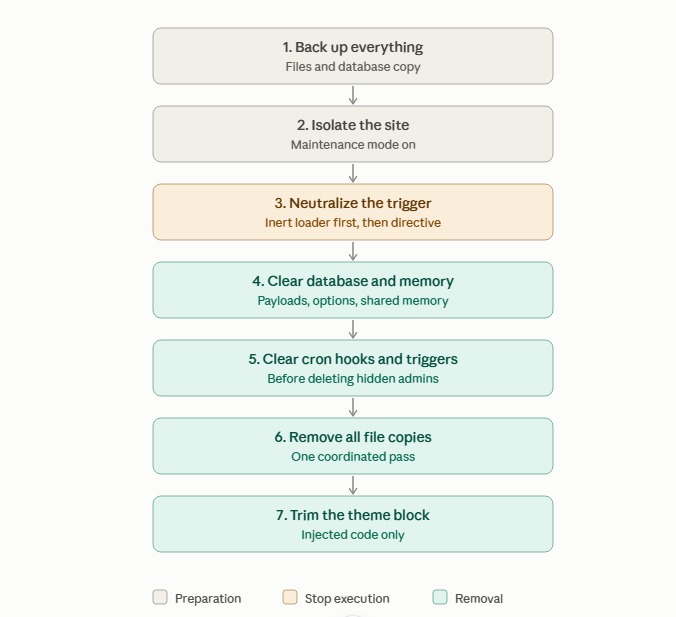
Order matters here. Sucuri's guidance is to stop execution before removing components. Here is the sequence, with some practical framing.
After Cleanup
- Rescan and monitor for any returning components over the following days
- Rotate every credential: WordPress, database, FTP/SSH, hosting panel, and API keys
- Invalidate all sessions and regenerate the salts in wp-config.php
- Find and close the original entry point. Check logs, outdated plugins and themes, and compromised accounts
- Check other sites on the same hosting account
If anything comes back, don't repeat the same deletion. Something was missed.
When to Call Your Host or a Professional
Get help if you're on shared hosting without access to PHP settings or server memory, if you find signs the compromise goes beyond WordPress, or if payment or customer data may be involved. In that last case, you may also have legal or compliance obligations around breach notification, so check what applies to you.
Prevention and Hardening
These are general best practices, not guarantees against SC specifically.
- Keep core, plugins, and themes updated, and remove anything you don't use
- Run a web application firewall and malware scanner
- Use file integrity monitoring so unexpected changes alert you
- Consider DISALLOW_FILE_EDIT and DISALLOW_FILE_MODS in wp-config.php
- Use least-privilege file permissions
- Enforce strong passwords and 2FA, and limit the number of administrators
- Regularly review users, cron events, database options, and triggers
- Keep offsite, versioned backups. A backup made after infection restores the infection too, so keep older clean points
For Agencies and Hosting Providers
If you manage many sites, one reappearing infection can ripple across accounts. Isolate accounts from each other, scan for the persistence locations above across your fleet, and prepare a standard response playbook so cleanup follows the right order every time. Alert on outbound blockchain gateway traffic from web servers where it has no business purpose.
Key Lessons
- Persistence is distributed, so your response must be too
- Deleting files treats the symptom, not the infection
- Legitimate infrastructure, like public blockchain gateways, can be abused as a command channel, so behavior-based detection matters
- Cleanup without closing the entry point invites reinfection
FAQ
Why does my WordPress malware keep coming back?
Because some components survive your cleanup, such as database payloads, scheduled tasks, or memory copies, and they rebuild what you deleted.
Can restoring a backup remove SC?
Only if the backup predates the infection and you also close the entry point and rotate credentials. A backup taken after infection contains the problem.
Can a security plugin remove it on its own?
Unlikely to be enough. SC can remove security plugins, hide from plugin lists, and regenerate itself, so manual, ordered cleanup is typically needed.
Does reinstalling WordPress core fix it?
Not by itself. SC lives in plugins, drop-ins, the theme, the database, config files, and memory, not just in core.
How do I find hidden administrator accounts?
Query the users table directly (or use WP-CLI) rather than relying on the dashboard list, and check for orphaned options linked to account IDs.
Can SC steal payment data?
The malware can deliver browser scripts that could enable payment theft, but the research doesn't quantify confirmed losses.
Should I switch hosts?
Not necessarily. Moving to a new host without cleaning the site just moves the infection. Fix the site first.
References
- Sucuri's original SC research report (September 2026), the primary source for this post
- WordPress documentation on wp-config.php hardening constants
- WP-CLI documentation for checksum verification and user and cron commands